

- Industries
Industries
- Functions
Functions
- Insights
Insights
- Careers
Careers
- About Us

Disaster Recovery







Disaster can strike a business at any moment. Research shows that without preparation and data protection, over 50% of businesses will not survive a major disaster. It is crucial to assess your IT infrastructure and understand what information security measures you can take to decrease the damage caused by a disaster and recover operations quickly. Today, disaster recovery planning is crucial for any business, especially those operating either partially or entirely in the cloud. Disasters that interrupt service and cause data loss can happen anytime without warning your network could have an outage, a critical bug could get released, or your business might have to weather a natural disaster. Organizations with robust and well-tested disaster recovery strategies can minimize the impact of disruptions, achieve faster recovery times, and resume core operations rapidly when things go awry.
What Is Disaster Recovery?
Disaster recovery is the process by which an organization anticipates and addresses technology-related disasters. The process of preparing for and recovering from any event that prevents a workload or system from fulfilling its business objectives in its primary deployed location, such as power outages, natural events, or security issues. Disaster recovery targets are measured with Recovery Point Objectives (RPO) and Recovery Time Objectives (RTO). The failures handled by disaster recovery tend to be rarer than those covered by high availability and are larger scale disaster events. Disaster recovery includes an organization’s procedures and policies to recover quickly from such events.
Key Elements Of A Disaster Recovery Plan
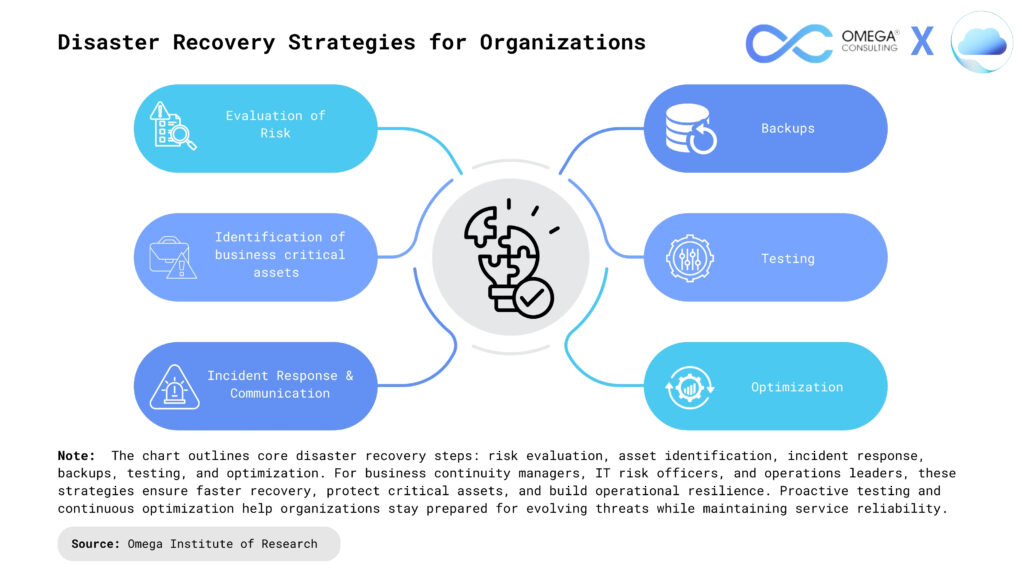
A disaster recovery team: The organization assigns a team of people responsible for making, implementing, testing, and managing its disaster recovery plan. The plan must outline the role of each member of the organization, as well as their responsibilities in the event of a disaster. If a disaster happens, the team members must have predetermined methods of communication with each other, employees, customers, and vendors. The communication plan should account for likely infrastructure failures that may negatively impact email and other methods of conveying information.
Evaluation of risk: The organization must figure out the various hazards that are likely to necessitate a disaster recovery plan. Then the appropriate measures should be designed based on the event type. This may vary depending on geographic location. A range of natural disasters even those uncommon to the area should also be accounted for. When considering what to do in case the organization suffers a cyberattack, the functionality of the systems and endpoints at risk must be included in the disaster recovery plan, as well as essential and sensitive data.
Identification of business-critical assets: An effective disaster recovery plan documents the systems, data, applications, and related resources that are most essential to maintain business continuity. The plan should also outline the steps needed to recover and protect important data.
Backups: First, the team needs to figure out what must be backed up or moved if a disaster hits. The organization also has to make sure the backup methods are established, as well as who will be responsible for creating the backups and performing any restorations or migrations. The plan should involve a recovery point objective (RPO), which dictates how frequently backups are made, and a recovery time objective (RTO), which outlines the maximum acceptable amount of downtime the organization is willing to tolerate after a disaster. The data from these metrics will serve as a guide as the IT team determines disaster recovery objectives.
Testing and optimization: The recovery team is responsible for making sure the disaster recovery system is ready for an event by continually testing it and updating its various elements. For cyberattacks, for example, the team must make sure the security measures in place are up to date and reflect the most recent cyber threats on the landscape.
Types Of Disaster Recovery
Back-up: This is the simplest type of disaster recovery and entails storing data off site or on a removable drive. However, just backing up data provides only minimal business continuity help, as the IT infrastructure itself is not backed up.
Cold Site: In this type of disaster recovery, an organization sets up a basic infrastructure in a second, rarely used facility that provides a place for employees to work after a natural disaster or fire. It can help with business continuity because business operations can continue, but it does not provide a way to protect or recover important data, so a cold site must be combined with other methods of disaster recovery.
Hot Site: A hot site maintains up-to-date copies of data at all times. Hot sites are time-consuming to set up and more expensive than cold sites, but they dramatically reduce down time.
Disaster Recovery as a Service (DRaaS): In the event of a disaster or ransomware attack, a DRaaS provider moves an organization’s computer processing to its own cloud infrastructure, allowing a business to continue operations seamlessly from the vendor’s location, even if an organization’s servers are down. DRaaS plans are available through either subscription or pay-per-use models.
Back Up as a Service: Similar to backing up data at a remote location, with Back Up as a Service, a third party provider backs up an organization’s data, but not its IT infrastructure.
Datacenter disaster recovery: The physical elements of a data center can protect data and contribute to faster disaster recovery in certain types of disasters. For instance, fire suppression tools will help data and computer equipment survive a fire. A backup power source will help businesses sail through power outages without grinding operations to a halt. Of course, none of these physical disaster recovery tools will help in the event of a cyber attack.
Virtualization: Organizations can back up certain operations and data or even a working replica of an organization’s entire computing environment on off-site virtual machines that are unaffected by physical disasters. Using virtualization as part of a disaster recovery plan also allows businesses to automate some disaster recovery processes, bringing everything back online faster.
Point-in-time copies: Point-in-time copies, also known as point-in-time snapshots, make a copy of the entire database at a given time. Data can be restored from this back-up, but only if the copy is stored off site or on a virtual machine that is unaffected by the disaster.
Instant recovery: Instant recovery is similar to point-in-time copies, except that instead of copying a database, instant recovery takes a snapshot of an entire virtual machine.
Benefits Of Disaster Recovery
Ensures business continuity: When a disaster strikes, it can be detrimental to all aspects of the business and is often costly. It also interrupts normal business operations, as the team’s productivity is reduced due to limited access to tools they require to work. A disaster recovery plan prompts the quick restart of backup systems and data so that operations can continue as scheduled.
Enhances security and compliance: Integrating data protection, backup, and restoring processes into a disaster recovery plan limits the impact of ransomware, malware, or other security risks for business. For example, data backups to the cloud have numerous built-in security features to limit suspicious activity before it impacts the business.
Improves customer retention: If a disaster occurs, customers question the reliability of an organization’s security practices and services. The longer a disaster impacts a business, the greater the customer frustration. A good disaster recovery plan mitigates this risk by training employees to handle customer inquiries. Customers gain confidence when they observe that the business is well-prepared to handle any disaster.
Reduces recovery costs: Depending on its severity, a disaster causes both loss of income and productivity. A robust disaster recovery plan avoids unnecessary losses as systems return to normal soon after the incident. For example, cloud storage solutions are a cost-effective data backup method. You can manage, monitor, and maintain data while the business operates as usual.
Faster recovery: Disaster recovery solutions make restoring your data and workloads easier so you can get business operations back online quickly after a catastrophic event. DR plans leverage data replication and often rely on automated recovery to minimize downtime and data loss.
How Does Disaster Recovery Work?
Prevention: To reduce the likelihood of a technology-related disaster, businesses need a plan to ensure that all key systems are as reliable and secure as possible. Because humans cannot control a natural disaster, prevention only applies to network problems, security risks, and human errors. You must set up the right tools and techniques to prevent disaster. For example, system-testing software that auto-checks all new configuration files before applying them can prevent configuration mistakes and failures.
Anticipation: Anticipation includes predicting possible future disasters, knowing the consequences, and planning appropriate disaster recovery procedures. It is challenging to predict what can happen, but you can come up with a disaster recovery solution with knowledge from previous situations and analysis. For example, backing up all critical business data to the cloud in anticipation of future hardware failure of on-premises devices is a pragmatic approach to data management.
Mitigation: Mitigation is how a business responds after a disaster scenario, aiming to reduce the negative impact on normal business procedures by ensuring all key stakeholders know what to do in such events. This includes updating documentation, conducting regular disaster recovery testing, identifying manual operating procedures to follow during an outage, and coordinating a disaster recovery strategy with the appropriate personnel.
Applications of Disaster Recovery in Business
Ensuring Continuity of Operations: Disasters whether natural, technical, or human-induced can halt operations unexpectedly. A well-designed disaster recovery plan ensures rapid restoration of systems, minimizes business interruption, and allows organizations to continue serving customers with minimal disruption.
Safeguarding Competitive Position: In highly competitive markets, service outages can quickly erode customer loyalty. By ensuring service availability even during crises, disaster recovery preserves customer relationships, protects revenues, and strengthens competitive advantage.
Ensuring Regulatory Compliance: Many industries are bound by strict compliance standards for data privacy, security, and retention. A comprehensive DR strategy ensures adherence to these regulations, reducing the risk of legal action, financial penalties, and reputational damage.
Minimizing Data Loss: Data is a critical asset. Prolonged outages or system failures can result in irreversible data loss. Modern DR solutions with real-time data replication, off-site backups, and redundancy ensure that valuable business information remains intact and recoverable.
Maintaining SLA Commitments: Customers expect consistent service levels. Downtime can trigger SLA violations, leading to financial penalties and lost contracts. Disaster recovery helps organizations meet uptime guarantees and maintain customer trust even during adverse events.
Protecting Brand Reputation: The ability to recover quickly from disruptions directly impacts a company’s public image. Demonstrating resilience through effective disaster recovery safeguards brand equity, investor confidence, and long-term business viability.
Building a Disaster Recovery Team for the Organization
Crisis management: The individual in charge of crisis management implements the disaster recovery plan right away. They communicate with other team members and customers, and they coordinate the disaster recovery process.
Business continuity: The business continuity manager ensures that the disaster recovery plan aligns with results from business impact analysis. They include business continuity planning in the disaster recovery strategy.
Impact recovery and assessment: Impact recovery and assessment involves specialized impact assessment managers who are experts in IT infrastructure and business applications. They assess and fix issues related to network infrastructure, servers, and databases, while also managing other disaster recovery tasks such as application integrations, maintaining data consistency, and overseeing application settings and configurations.
IT applications: This role monitors which application activities should be implemented based on a restorative plan. Tasks include application integrations, application settings and configuration, and data consistency.
Executive management: The executive team will need to approve the strategy, policies and budget related to the disaster recovery plan, plus provide input if obstacles arise.Critical business units: A representative from each business unit will ideally provide feedback on disaster recovery planning so that their specific concerns are addressed.
Conclusion
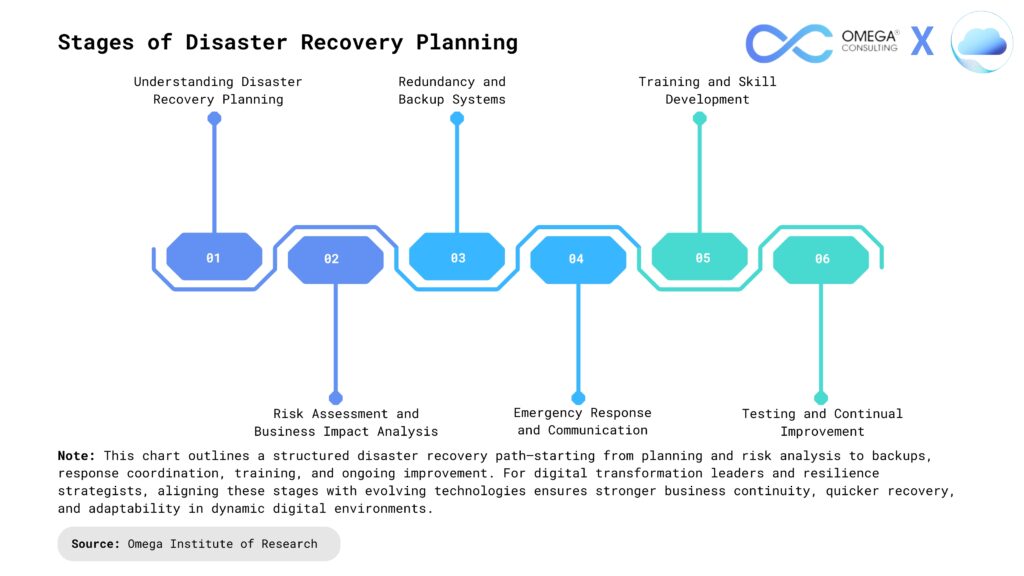
Disaster recovery (DR) is essential for businesses to withstand unexpected disruptions such as cyberattacks, natural disasters, or system failures. A strong DR plan combines prevention, anticipation, and mitigation, enabling organizations to identify risks, prepare recovery procedures, and act quickly during crises. Key elements include clear role assignments, updated documentation, regular testing, and advanced solutions like DRaaS, virtualization, and automation to ensure swift recovery. Effective disaster recovery not only minimizes downtime and data loss but also safeguards customer trust, regulatory compliance, and competitive advantage, helping businesses maintain stability and continuity while securing long-term growth and resilience against future threats.
- https://cloud.google.com/learn/what-is-disaster-recovery
- https://www.vmware.com/topics/disaster-recovery
- https://aws.amazon.com/what-is/disaster-recovery/
- https://www.ibm.com/think/topics/disaster-recovery
- https://cloudian.com/guides/disaster-recovery/disaster-recovery-5-key-features-and-building-your-dr-plan/
- https://www.fortinet.com/resources/cyberglossary/disaster-recovery
- https://www.cohesity.com/glossary/disaster-recovery/
Subscribe
Select topics and stay current with our latest insights
- Functions